
How Much Does iPhone 11 Screen Repair Cost? The Dreaded Screen Crack - We've all been there – that horrible moment when your iPhone 11 slips out of your pocket and crashes onto the pavement. Your stomach drops, and you're almost too scared to pick it up and see the damage.
Why iPhone 11 Screens Break So Easily
Apple talks a big game about their "durable glass," but let's be honest – the iPhone 11's 6.1-inch screen isn't exactly bulletproof. One wrong drop onto concrete or a sharp edge, and you're staring at a spiderweb of cracks across your display.
Understanding the Real Cost of Official Apple Repairs
Here's where things get painful for your wallet. Walk into an Apple Store without AppleCare+, and they'll cheerfully quote you somewhere between £196 and £206 for a screen replacement. That's a massive chunk of change for a phone that's already a few years old.
Why Third-Party Repairs Make Financial Sense
This is exactly why more people are choosing to buy iPhone 11 LCD screen replacements from trusted suppliers instead. You can get comparable quality for literally a fraction of what Apple charges, and nobody will know the difference once it's installed properly.
The DIY Repair Revolution
Loads of people are now fixing their own phones instead of handing over ridiculous amounts to repair shops. When you buy iPhone 11 LCD screen parts yourself, you're basically cutting out the expensive middleman and keeping that money in your pocket.
What You Get When You Buy iPhone 11 LCD Screen from E-TECH61
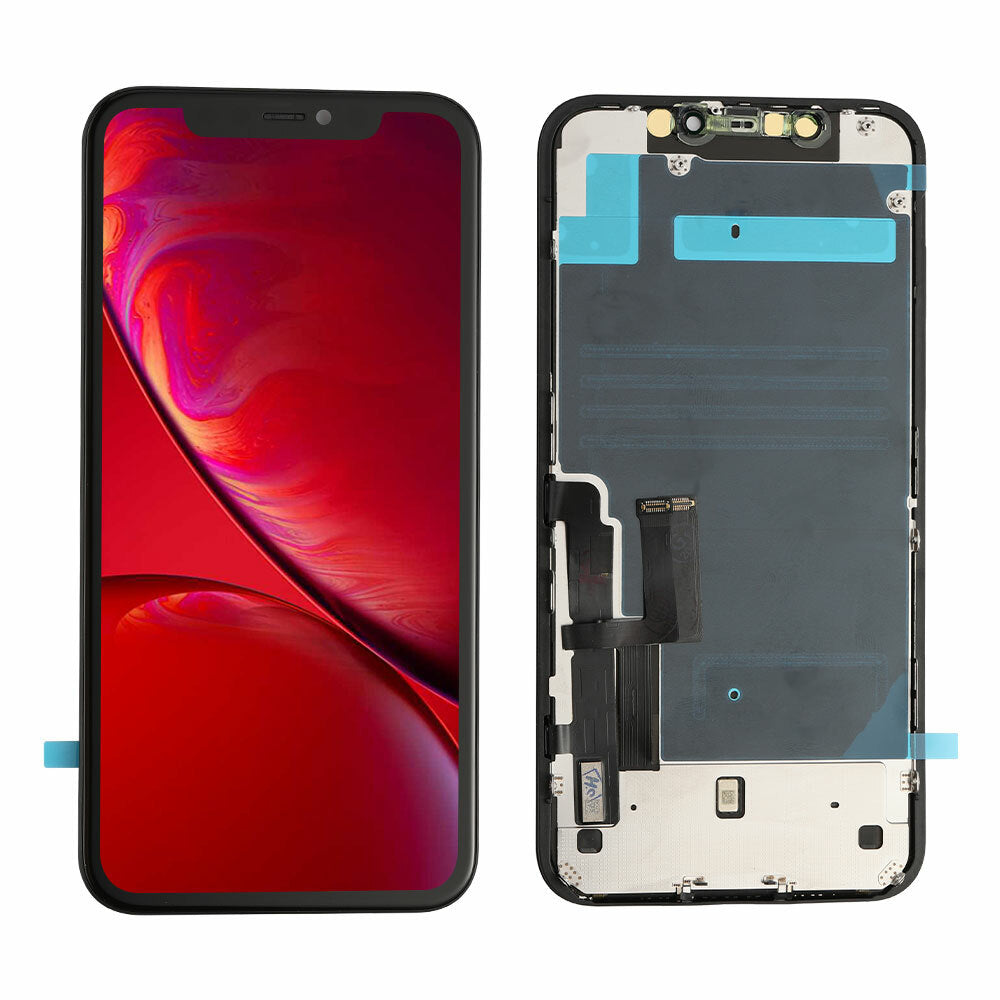
E-TECH61 is a UK-based online store that's built up a solid reputation for supplying quality iPhone parts. Their iPhone 11 screens come as complete assemblies, which means everything's already put together and ready to fit into your phone.
Quality Considerations That Actually Matter
Look, not every replacement screen is worth your money – some are absolute rubbish. That's why knowing where to buy iPhone 11 LCD screen replacements matters so much, because quality varies wildly from dirt-cheap knockoffs to premium parts.
Original vs Aftermarket: The Quality Spectrum
You've got screens pulled from refurbished phones that match Apple's original specs almost perfectly. Then there's aftermarket stuff that ranges from surprisingly decent to "why did I waste my money on this?" depending on the manufacturer.
Breaking Down Screen Assembly Components
A proper iPhone 11 screen isn't just glass – it includes the LCD panel, the touch digitizer, your front camera assembly, and the earpiece speaker. When you buy iPhone 11 LCD screen kits from E-TECH61, they bundle it all together so you're not hunting for individual bits.
The LCD vs OLED Confusion
Here's something that catches people out – the regular iPhone 11 uses LCD technology, not the fancy OLED in the Pro models. Actually, this works in your favour because LCD screens are genuinely cheaper to replace than OLED ones.
Typical Price Ranges for Replacement Screens
The cheapest screens start around £25-£40, but honestly, they're often disappointing with dodgy colours and iffy touch response. Mid-range options between £50-£80 are much better, while premium screens when you buy iPhone 11 LCD screen replacements run about £80-£120.
What E-TECH61 Offers UK Customers
Shopping from a UK supplier like E-TECH61 means no surprise customs charges or waiting weeks for delivery from China. They've got different quality grades available so you can pick based on what your budget allows.
Hidden Costs People Forget About
Don't forget you'll need tools if you're doing this yourself. A decent repair toolkit with the right screwdrivers and prying tools costs about £10-£20, but you can use it for future repairs too.
Professional Installation Costs in the UK
Local repair shops typically charge between £40-£80 just for labour on top of the screen cost. Those mobile repair vans that come to your house? They're convenient but often charge £100-£150 all-in for the same job.
Time Investment for DIY Repairs
Your first attempt will probably take somewhere between 45 minutes to an hour and a half if you're being careful. Once you know what you're doing, you can smash it out in 20-30 minutes.
The Skill Level Required
iPhone 11 screen replacement isn't rocket science, but it's not exactly child's play either. It's trickier than swapping a battery but nowhere near as complicated as the proper micro-soldering work that professionals do.
Essential Tools You'll Need
When you buy iPhone 11 LCD screen parts, make sure you've sorted out a heat source (hairdryer works fine), the proper screwdrivers for Apple's annoying pentalobe screws, and some plastic tools so you don't scratch things. A magnetic mat is brilliant for keeping track of all those tiny screws.
Step-by-Step Overview of the Repair Process
You start by removing two screws at the bottom, then carefully heating around the edges to soften that sticky adhesive. Use a suction cup to lift the screen gently while sliding a plastic tool around to separate it from the frame.
Critical Connection Points
There are three main display connectors plus the Face ID sensor assembly that need transferring to your new screen. These connections are fragile as anything, so don't force them or you'll create a much bigger problem.
Common Mistakes That Cost Extra Money
Rushing is the biggest mistake people make – trying to yank the screen off without properly softening the adhesive bends the frame or tears cables. When you buy iPhone 11 LCD screen replacements, remember that patience saves money here.
The Adhesive Situation
Most replacement screens from suppliers like E-TECH61 come with adhesive already stuck on, which is handy. If yours doesn't, you'll need to grab separate waterproof adhesive strips to seal everything properly.
Warranty Implications Worth Considering
Apple's warranty doesn't cover broken screens anyway, so you're not voiding anything that wasn't already toast. That said, if something else goes wrong that should be covered, Apple might get funny about servicing a phone with third-party parts.
Testing Before Final Assembly
Never seal everything down until you've tested the new screen properly. Connect it up, turn the phone on, and check that touch works everywhere, colours look right, brightness adjusts, and Face ID still functions.
Face ID Complications
This bit's crucial – you must transfer the Face ID sensor from your old screen to the new one without damaging it. When you buy iPhone 11 LCD screen assemblies, they never include this because it's married to your specific phone.
True Tone and Display Calibration
Original Apple screens have a special chip that enables True Tone, which adjusts colours based on room lighting. Most aftermarket screens lack this chip, so you'll lose that feature even if everything else works perfectly.
Proximity Sensor Transfer
That little proximity sensor that turns your screen off during phone calls needs moving over carefully too. Mess this up, and your screen stays on during calls, leading to all sorts of accidental button presses with your face.
Quality Indicators After Installation
A good repair shouldn't show light leaking around the edges, brightness should be even across the whole screen, touch should work smoothly everywhere, and there shouldn't be any weird flickering. If you spot problems after you buy iPhone 11 LCD screen parts and fit them, the screen might be faulty.
Return Policies and Warranties
Decent suppliers like E-TECH61 usually offer warranties on parts, typically 30-90 days against defects. Keep all the packaging and paperwork just in case you need to return a duff screen.
When Professional Repair Makes More Sense
If you're clumsy with delicate stuff or your hands shake, or honestly if your time's worth more than the labour savings, paying a professional might be smarter. Some folks buy iPhone 11 LCD screen parts and then just pay someone to fit it, splitting the difference.
Insurance Claim Considerations
Check your phone insurance if you've got it through your network or credit card. The excess is often £50-£100 though, which might not be much cheaper than sorting it yourself depending on which screen you choose.
Environmental Benefits of Repair
Fixing your phone instead of binning it and buying new is genuinely better for the planet. When you buy iPhone 11 LCD screen replacements and extend your phone's life, you're keeping perfectly good components out of landfills.
Resale Value After Repair
A phone with a professionally fitted screen will sell for more than one with obvious DIY bodge marks. If you're planning to sell your iPhone 11 eventually, factor this into whether you tackle it yourself or pay someone who knows what they're doing.
Screen Protector Recommendations Post-Repair
After spending money on a new screen, stick a tempered glass protector on immediately. They're only £5-£15 and could save you from needing another repair if you drop it again.
Regional Price Variations Across the UK
London repair shops absolutely hammer you on prices compared to smaller towns because of their overheads. When you buy iPhone 11 LCD screen parts online from E-TECH61, you pay the same whether you're in central London or rural Scotland.
Bulk Purchase Discounts
If you're repairing multiple phones or thinking about doing this as a side hustle, places like E-TECH61 often do discounts on bulk orders. Repair shops themselves usually buy wholesale rather than paying retail prices.
Authenticity Verification
There are dodgy sellers flogging fake "OEM" screens that are actually cheap rubbish. When you buy iPhone 11 LCD screen components, check reviews and look for quality indicators rather than just grabbing the cheapest option.
The Role of Customer Reviews
Always read recent reviews before buying from any supplier. A few complaints are normal, but if you see patterns of poor quality or terrible customer service, that's your cue to shop elsewhere.
Shipping Speed and Costs
UK-based suppliers like E-TECH61 usually deliver within a couple of days with standard post. Express delivery's available if you're desperate, though it can add a fair bit to your total cost.
Payment Security Online
Only buy from websites with proper secure payment systems and clear return policies. When you buy iPhone 11 LCD screen replacements online, check the site uses HTTPS and recognized payment methods like PayPal or Stripe.
Alternative Repair Options to Consider
Mail-in repair services let you post your phone to specialists who fix it and send it back within a few days. These typically cost more than DIY but less than local shops, which might suit you if you're nervous about doing it yourself.
AppleCare+ Economics
If you've got AppleCare+, screen repairs only cost £25, which makes third-party repair less appealing financially. But AppleCare+ itself costs £149 upfront or £7.49 monthly, so work out whether you'll actually use it enough to make it worthwhile.
Repair Kits vs Individual Components
Some suppliers bundle everything together – screen, tools, and adhesive in one package. When you buy iPhone 11 LCD screen kits versus separate components, you might pay a bit more but it's more convenient and you know everything's compatible.
Video Tutorials and Learning Resources
YouTube's absolutely packed with iPhone 11 screen replacement videos, though quality varies massively. iFixit's guides are particularly good with clear photos and proper troubleshooting advice that'll save you headaches.
Making Your Decision
Think honestly about your comfort level with fiddly electronics work, whether you've got the time, and what your budget allows. If you decide to buy iPhone 11 LCD screen replacements for DIY repair, spend a bit extra on decent parts rather than going for the absolute cheapest option.
The Bottom Line on Screen Repair Economics
iPhone 11 screen repair doesn't need to cost over £200 through Apple's official channels. By getting quality parts from established UK suppliers like E-TECH61 and either doing it yourself or finding a local independent technician, you can get your phone working perfectly again for way less money.
Share:
Buy iPhone 15 Pro LCD Screen: Best Replacements UK
iPhone 11 Screen Replacement Everything You Need to Know 2026