
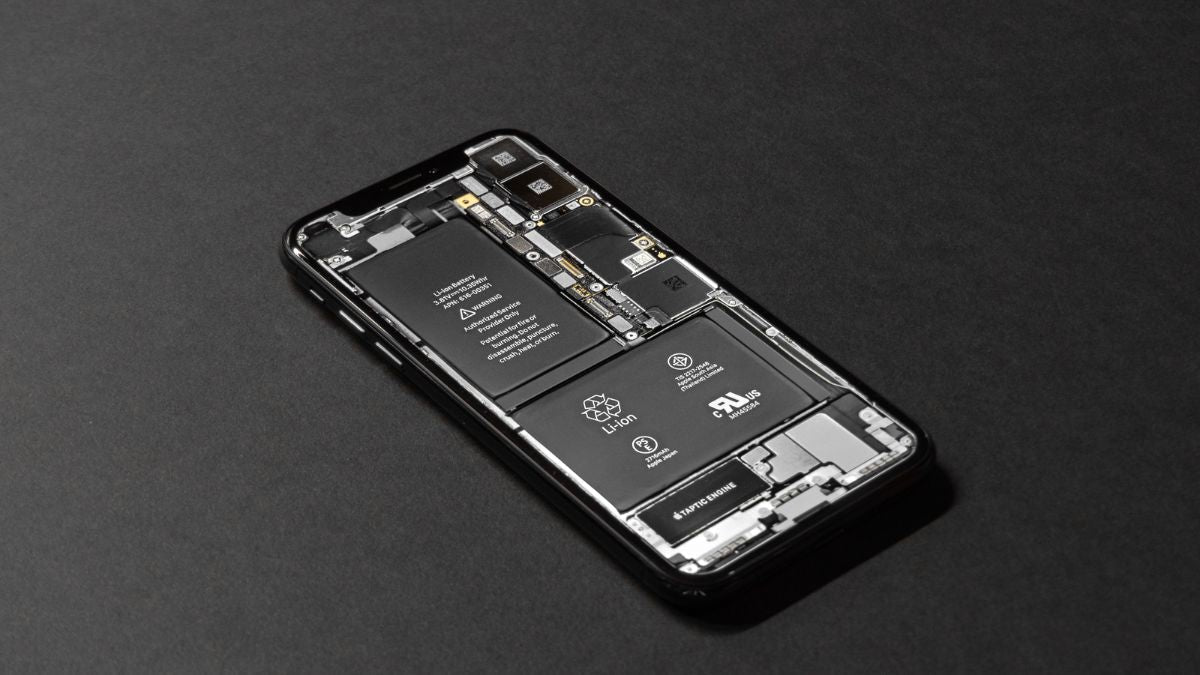
When your iPhone 17 starts losing battery faster than it should, the first question you need to answer is whether it's a software issue or a hardware problem. Software bugs are easy to fix with updates and tweaks, but hardware defects usually mean you need professional repairs or a replacement.
Most people jump to conclusions and assume their battery is dying when really it's just some app going haywire in the background. Understanding the difference between software and hardware issues will save you time, money, and a lot of frustration.
Common Signs Your iPhone 17 Has a Software-Related Battery Issue
If your battery drain started right after updating to a new iOS version, you're almost definitely dealing with a software bug. Apple releases updates all the time, and sometimes those updates introduce glitches that absolutely destroy battery life until they patch it.
Another dead giveaway of software problems is when your battery drain is inconsistent and random. One day your battery is fine, the next day it's dead by noon, and there's no pattern to it - that screams software issue rather than hardware failure.
When specific apps show ridiculously high battery usage in your settings, that's clearly a software problem. If Facebook is using 60% of your battery or some random game you barely play is the top consumer, you know it's not your actual battery that's broken.
Battery drain that gets better after restarting your phone is definitely software-related. Hardware problems don't magically fix themselves when you reboot, but software glitches and stuck processes absolutely do.
Hardware Defect Warning Signs in iPhone 17 Battery Performance
If your iPhone 17 had terrible battery life from the moment you took it out of the box, you probably got a defective battery. Brand new phones should have excellent battery life, so immediate problems point to manufacturing defects.
Your battery percentage jumping around wildly is a major red flag for hardware issues. When your phone shows 50% one minute, then drops to 20% the next, or shuts off when it still shows charge remaining, that's physical battery failure.
Feeling your iPhone 17 get unusually hot during normal use suggests hardware problems with either the battery or charging circuitry. Some warmth is normal during charging or gaming, but excessive heat during basic tasks means something is physically wrong.
Physical signs like a swollen battery, bulging screen, or separated back panel are 100% hardware problems that need immediate professional attention. These are dangerous conditions that can lead to fires or explosions if ignored.
How iOS Updates Can Trigger Battery Drain Issues
Major iOS updates often cause temporary battery drain because your iPhone has to reindex everything and adjust to the new software. This process usually takes 24 to 48 hours, after which battery life typically returns to normal without you doing anything.
Sometimes iOS updates introduce actual bugs that drain batteries until Apple releases a patch. The bad news is you're stuck waiting for Apple to fix it, but the good news is these software bugs always get resolved eventually.
Background processes and new features added in iOS updates sometimes default to battery-draining settings. Things like new widgets, updated background refresh policies, or enhanced features might be enabled automatically and you need to go turn them off manually.
Beta versions of iOS are notorious for having terrible battery life because they're unfinished software. If you're running a beta version and complaining about battery drain, that's completely expected and you should either wait for the final release or downgrade.
App-Related Software Problems Causing Battery Drain
Third-party apps with poor coding or bugs can absolutely devastate your iPhone 17's battery life. Developers sometimes release buggy updates that cause apps to run constantly in the background, consume excessive resources, or fail to properly terminate processes.
Social media apps are particularly bad about this because they're designed to keep you engaged and constantly checking. Facebook, Instagram, TikTok, and Twitter use aggressive background refresh strategies that prioritize real-time updates over your battery life.
Even Apple's own apps can sometimes cause battery drain after iOS updates. Mail, Photos, Messages, and other built-in apps might misbehave temporarily until Apple releases fixes in subsequent updates.
Corrupted app data or cache files can cause apps to malfunction and drain battery excessively. Deleting and reinstalling problematic apps usually fixes these issues because it wipes out the corrupted data causing problems.
Testing Whether Your iPhone 17 Battery Drain Is Software-Based
The easiest way to test for software issues is to restart your iPhone and monitor battery performance over the next few hours. If battery life immediately improves after a restart, you definitely have a software problem rather than hardware failure.
Try charging your phone to 100%, then use it normally while paying attention to which apps you're using. If certain apps consistently cause rapid battery drops, those specific apps are your problem and not your battery hardware.
Check your battery usage statistics in Settings under Battery to see the breakdown of what's using power. Software problems will show up as specific apps or processes consuming abnormal amounts of battery percentage.
Put your iPhone in Low Power Mode and see if battery drain slows down significantly. If Low Power Mode makes a huge difference, your battery hardware is probably fine and you're dealing with software settings or apps causing excessive drain.
Diagnosing Hardware Defects in iPhone 17 Batteries
Check your battery health in Settings under Battery to see the maximum capacity percentage. If your iPhone 17 is relatively new and battery health is already below 90%, you likely have a defective battery that degraded too quickly.
Hardware defects often cause the battery percentage to drop rapidly in specific ranges. For example, if your battery always dies quickly between 30% and 0% but holds charge fine from 100% to 30%, that's a hardware issue with certain battery cells.
Temperature problems during normal use indicate hardware defects in the battery or charging system. If your phone gets hot just browsing the web or checking email, that's not normal behavior and suggests physical component failure.
Inconsistent charging behavior where your iPhone charges very slowly, stops charging randomly, or shows incorrect battery percentages during charging points to hardware problems. Software doesn't cause charging to physically work incorrectly.
The Role of Background Processes in Software-Related Drain
iOS system processes like Spotlight indexing, iCloud syncing, and Photos library analysis can cause temporary battery drain that seems like a defect. These background tasks are actually normal but happen at inconvenient times after updates or when you add lots of new data.
Mail fetch processes running constantly for multiple accounts create significant background battery drain. This is purely a software/settings issue that you can fix by changing fetch frequency or switching to manual email checking.
Location services running for multiple apps simultaneously will drain any battery fast because GPS hardware consumes substantial power. This is a software configuration issue where too many apps have location permissions they don't actually need.
App refresh processes that never properly terminate due to software bugs will run indefinitely and destroy battery life. These zombie processes are software problems that restarts or app reinstalls can fix.
Manufacturing Defects That Cause Hardware Battery Problems
Faulty battery cells that shipped from the factory cause immediate and persistent battery drain from day one. These manufacturing defects mean the battery was never good to begin with and no amount of software fixes will help.
Defective charging circuitry can prevent proper power management and cause accelerated battery drain. The battery itself might be fine, but if the charging controller or power management chips are defective, you'll have terrible battery life.
Poor battery connections or damaged flex cables inside the iPhone can cause intermittent battery problems. These physical connection issues sometimes develop during shipping or from the manufacturing process itself.
Quality control failures occasionally let phones with substandard batteries reach customers. Apple's quality control is generally excellent, but defective units do slip through occasionally and cause problems for unlucky buyers.
How to Fix Software-Related iPhone 17 Battery Drain
Update to the latest iOS version immediately because Apple often includes battery fixes in updates. Even minor point updates like going from iOS 17.1 to 17.1.1 can include important battery optimizations and bug fixes.
Reset all settings to clear out any problematic configurations without losing your data. This takes your iPhone back to default settings and often resolves battery drain caused by weird setting combinations or corrupted preferences.
Delete and reinstall apps that show excessive battery usage in your statistics. This nuclear option removes corrupted app data and gives you a fresh installation that usually behaves properly.
Disable background app refresh for apps that don't need real-time updates and turn off location services for apps that don't require your position. These simple software setting changes can dramatically improve battery life.
When Hardware Defects Require Professional Repair
If you've tried all the software fixes and your battery is still draining rapidly, you probably need hardware service. At that point, continuing to troubleshoot software is just wasting your time when the physical battery is the problem.
Battery swelling or physical deformation requires immediate professional attention and you should stop using the device. Swollen batteries are dangerous and can rupture, leak, or even catch fire if you continue using them.
If your iPhone 17 is under warranty or AppleCare+, Apple will replace defective batteries for free. Don't waste money on third-party repairs when you have coverage that will fix hardware defects at no cost.
Persistent hardware issues like rapid degradation, temperature problems, or charging failures need professional diagnosis with proper testing equipment. Only Apple or authorized service providers have the tools to properly test and replace faulty components.
The Impact of iOS Beta Software on Battery Performance
Running iOS beta versions almost guarantees terrible battery life because the software is unfinished and unoptimized. Beta software includes debugging code, incomplete features, and bugs that haven't been fixed yet, all of which drain batteries.
Apple specifically warns that beta software will have problems including poor battery performance. If you choose to run beta versions, accepting bad battery life is part of the deal until the final release comes out.
Some battery drain in betas is intentional because Apple enables extra logging and diagnostics to help them find bugs. This background logging and reporting uses power but helps Apple fix problems before the public release.
Downgrading from beta to stable iOS versions sometimes fixes battery problems, but it's a hassle that requires backing up and restoring. Most people are better off just waiting for the final iOS release rather than dealing with beta issues.
Understanding Normal vs. Abnormal Battery Degradation
All lithium-ion batteries lose capacity over time, and losing about 1-2% per year is completely normal. If your iPhone 17 is a year old and battery health shows 98%, that's expected degradation and not a defect.
Rapid degradation like dropping to 85% health in six months or less indicates either a defective battery or extremely abusive usage patterns. Normal use shouldn't degrade batteries that quickly, so something is wrong either with the battery or how you're using it.
Apple considers batteries defective if they drop below 80% capacity within the first year of normal use. If your battery degrades that fast while under warranty, Apple should replace it for free as a defective component.
Heavy users who charge multiple times daily and use their phones constantly will see faster degradation than light users. This is normal physics and chemistry, not a defect, though it might feel unfair if you paid a lot for your phone.
Charging Habits That Mimic Hardware Defects
Using cheap third-party chargers that don't regulate power properly can damage your battery and cause issues that look like hardware defects. Counterfeit or low-quality charging accessories deliver inconsistent power and can permanently damage battery cells.
Constantly charging to 100% and discharging to 0% stresses the battery and accelerates degradation. While this doesn't create immediate defects, it makes your battery age faster and can make a good battery seem defective after a few months.
Charging your iPhone in extremely hot environments like inside a hot car damages the battery permanently. Heat accelerates chemical degradation inside battery cells and can cause capacity loss that looks like a manufacturing defect.
Leaving your iPhone plugged in 24/7 keeps the battery at high charge states that increase degradation over time. This isn't a defect, but it does age your battery faster than normal charging patterns.
Software Conflicts Between Apps Causing Battery Drain
Sometimes two apps running simultaneously conflict with each other and cause excessive battery drain. These conflicts are software bugs where apps don't properly share resources or step on each other's processes.
Apps competing for location services, network access, or other system resources can create loops where both apps constantly wake each other up. This software conflict drains batteries rapidly even though neither app alone would cause problems.
Poorly designed apps that don't properly handle multitasking states can cause battery drain when switching between them. These software bugs prevent apps from entering low-power background states and they stay active consuming resources.
Outdated apps that haven't been updated for new iOS versions sometimes conflict with system processes. Developers need to update their apps for new iOS releases, and old incompatible apps can cause weird battery drain issues.
The Truth About Background App Refresh and Battery Life
Background App Refresh gets blamed for a lot of battery drain, but it's actually fairly efficient when working properly. The real problem is when apps abuse this feature or bugs cause apps to refresh constantly instead of at reasonable intervals.
Completely disabling Background App Refresh for all apps will definitely save battery but makes some apps less useful. The smart approach is selectively disabling it for apps that don't need real-time updates while leaving it on for important apps.
Some battery drain attributed to Background App Refresh is actually from push notifications triggering apps to wake up. Notifications and background refresh are different systems, but they both cause apps to use battery in the background.
Apps are supposed to complete background refreshes quickly and return to sleep, but bugs can cause them to stay active. When this happens, it's a software bug rather than the Background App Refresh feature itself being the problem.
Thermal Issues: Software Bug or Hardware Defect?
Excessive heat during normal use usually indicates hardware problems with the battery, processor, or power management systems. Software can make your phone work hard and generate heat, but extreme temperatures during light use suggest hardware failure.
Some iOS updates introduce bugs that cause excessive CPU usage and heat generation. If overheating started immediately after an update and affects many users, it's likely a software bug that Apple will fix quickly.
Gaming and intensive apps naturally generate heat as the processor works hard, and this is completely normal. Only sustained high temperatures during basic tasks like browsing or messaging suggest actual defects.
Charging generates heat normally, but excessive heat during charging can indicate problems with the charging circuitry or battery. If your phone gets uncomfortably hot while charging, that could be a hardware defect rather than normal operation.
Network Connection Problems Masking as Battery Issues
Weak cellular signals force your iPhone to use more power trying to maintain connections, which drains batteries quickly. This isn't a phone defect - it's just physics that weak signals require more transmission power.
5G connectivity consumes more battery than LTE, and constantly searching for 5G networks in areas with poor coverage absolutely murders battery life. Switching to LTE in settings can dramatically improve battery performance if you're in spotty 5G areas.
WiFi issues where your phone constantly disconnects and reconnects drain battery from the repeated authentication processes. This could be iOS bugs, WiFi router problems, or network configuration issues rather than battery defects.
Apps that continuously download data over cellular connections drain batteries from constant network activity. This is often software problems with poorly optimized apps rather than hardware defects.
How to Properly Test Your iPhone 17 Battery Health
Go to Settings, Battery, and Battery Health to check your maximum capacity percentage. Anything above 90% is generally fine, 80-90% is getting old but acceptable, and below 80% means you should consider replacement.
Apple's battery health metric only tells part of the story and doesn't catch all types of battery problems. A battery can show 100% health but still have other defects that cause poor performance.
Third-party battery testing apps aren't reliable and often give misleading information. Stick with Apple's built-in battery health feature or professional testing from Apple or authorized service providers.
Observing real-world performance over several days gives you better information than any health percentage. If your phone dies by dinner time with normal use, the battery is bad regardless of what the health metric shows.
Apple's Battery Warranty Coverage and Replacement Policy
Apple warrants that iPhone batteries will retain at least 80% capacity for one year under normal use. If your battery drops below 80% within a year, Apple should replace it for free as a warranty defect.
AppleCare+ extends battery coverage and includes replacement if your battery falls below 80% capacity at any point during the coverage period. This protection is valuable because it covers battery degradation beyond the standard warranty.
Out-of-warranty battery replacements from Apple cost significantly less than third-party repairs and maintain your phone's water resistance. Apple uses genuine batteries and properly seals the phone, while third-party repairs might compromise these features.
Apple runs diagnostics remotely through their support app to check battery health and system performance. These professional tests can identify problems you can't see in the settings and determine if you qualify for warranty service.
Software Optimization Features That Preserve Battery Life
Optimized Battery Charging learns your charging patterns and delays charging past 80% until you need your phone. This feature reduces battery aging from staying at full charge for hours and is pure software optimization helping hardware last longer.
Low Power Mode is Apple's built-in battery saver that reduces performance and background activity when enabled. This software feature can extend battery life by hours and proves that proper software management makes huge differences.
Automatic brightness adjustment using the ambient light sensor optimizes screen power consumption for conditions. This software feature balancing brightness with lighting conditions saves substantial battery compared to manual brightness settings.
Dark Mode on OLED iPhone 17 Pro displays saves battery by actually turning off pixels in black areas. This software display mode leveraging hardware capabilities can extend battery life by meaningful amounts with dark content.
Making the Final Determination: Software or Hardware?
If battery problems appeared suddenly after an iOS update and affect many users based on online reports, it's almost certainly a software bug. Hardware defects don't strike thousands of people simultaneously after software changes.
Battery issues present from day one on a brand new iPhone 17 are virtually always hardware defects. Software problems might develop over time, but immediate out-of-box battery failure points to manufacturing defects.
Problems that come and go randomly or improve after restarts are classic software issues. Hardware defects are consistent and persistent - they don't fix themselves temporarily.
When in doubt, contact Apple Support and run their diagnostic tests to get a professional opinion. Their tools can definitively determine whether you have software issues that you can fix or hardware defects requiring service.
iPhone 6S Plus Carphone Warehouse Deals and Offers
Share:
The Real Reasons Behind iPhone 17 Battery Life Issues
Why Is My iPhone 17 Battery Draining So Fast? | iPhone 17 Battery Drain Issues